top of page
UC Irvine Division of Continuing Education
International Housing
Housing@ce.uci.edu (949) 824-3161


Step 1. Look for the Router in the living room.
Step 2. Make sure that everything is connected.
Step 3. The router will look like this:
or


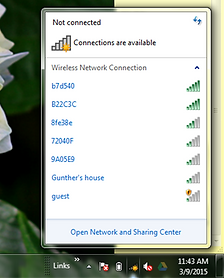
Step 4. Look for ID and Key on the side/bottom of the router.
Step 5. Grab your laptop, look for the ID and enter the key code (it's usually the first one).
Step 6. Wait for the Wi-Fi bars to be highlighted, then connect your phones & tablets.
How to Set Up Your Wi-Fi
PC
MAC
bottom of page